Lightbulb hacking
NB: Companion page to the permaculture chapter!
Session 0: A practical guide for the investigation of everyday (IoT) devices
Workshop set-up
A back-and-forth between the practical and the political. Dissecting the objects on [x] different layers. Meant as a critical thinking exercise.
Political discussion
Good to clarify our intention and specify our curiosity: What do we want from these devices? To discuss IoT in the context of the everyday! Collect your thoughts! Do you already have an hypothesis about the object in front of you?
Guide
- Inspect the facade
The object is laying in front of you. To get a better understanding of its workings and [imposed] meaning, we will first do some research on the object as a 'product'.
What is the [imposed] functionality of the object? What is it meant to be used for?
Looking at the object itself will give you some clues. Most devices are meant to be recognisable, they adhere to similar aesthetics. Try to dive deeper by inspecting it for sensors like camera's, LDR's (light-dependent resistor), infrared, microphones or speakers [these are often quite recognisable -- add images]. Maybe you are able to turn it on, download 'the app' or push all its buttons. Why is the object shaped like that? Why does the company advertise it like that? Does it actually do what it claims to be doing? Or is it doing less or maybe secretly doing more? Is there an app you have to download? Examine the app! How could this be shaped differently and why did the company decide to do it like this? What are their motives?
More clues can be found by looking at product pages, reviews, company websites and other documentation.
How is the object made? What aesthetic, political and/or functional choices have been made?
Taking the object into your hands will give you a feel for how it is made. Is it well-made or just a cheap piece of crap? Is the shape of it purely functional, and/or is it meant to give off a message to the 'consumer'? What does this tell you about the object?
[TODO: insert example image of those cutesy looking surveillance camera's for the home]
You look up all the info you can find. What does it mean? Why is the product advertised in this way? For example: the camera in your home is called a security camera and looks all sweet, the one on the street is called surveillance camera and looks all angry. It is meant to look harmless, no one will hang those rectangular police surveillance camera's in their living room. (nice re political aesthetics!)
Marketed as desirable product, hidden functions/features.
[example] > Meant to be hard to open or tweak.
Basically, what are the underlying motives to its design? Looking at product pages will help you with this as well.
What are the specifications of the product? In short; what are we working with? And what are we expecting to find when we open it up?
[example] > Look at labels on the object, documentation, product pages and use this information for deeper research. Does it have an FCC logo on it? [image] This means ...blabla... and you can look up more technical information in the FCC database. Sometimes images of the inside of the product are provided, which might in some cases help you with opening it up.
Also RoHs - also if the device is old (pre ???) it might have heavy metals / red cadmium / mercury in it so be careful
Check how the device connects to “mains power”! Most IoT devices are powered by a power adaptor (aka "wall-wart")[image] These adaptors convert the voltage that comes out of your wall (in Europe typicall 220v AC) to a much lower voltage and often to DC. Higher voltages are often used for devices that have motors (like vacuums) or amplifiers. This guide is aimed at low voltage devices - high voltage devices require more care and knowledge to avoid killing or hurting yourself or setting fire to your house or hacklab.
Working with typical volts (5v) should not be dangerous; however, it is important to be alert to whether the device is connected to the main electricity grid directly by a cable and plug. The electricity in the actual device is likely lower than mains voltage but the point at which the cable connects to the PCB could deliver a lethal shock if you touch it.
2. Peel it like an onion
Take out your screwdrivers and let the fun begin!
Let's start with some good practice to keep yourself and your surroundings safe.
Remove batteries from the device when possible, and unplug it from mains. Be extra careful when lithium batteries are involved, shortening them can be very dangerous. Be careful with big capacitors [add img] , make sure they dont hold any charge anymore.
And then you screw the thing open and you go >> what do we find here? Is this what we are expecting to be seeing?
- Carefully disassemble your object. Look at the parts.
- Identify areas of interest.
Try to identify the components connected to the pcb (sensors, speakers, camera's, light)
Is the pcb readable? [text on it, example img] What parts can you identify and does this correspond with the information from the manufacturer? [Explain some common characters found on pcb's, like B- B+, M- M+ etc] In a lot of cases, the same pcb will be used for different versions of the product. This means you might find unused connections. blabla
- next to programmable chips usually the programming pads
- there can be a jtag
- sometimes a uart that speaks human language
If you are lucky, there are some bare pads for the developers as well. Sometimes online you will find these described as "test points" - they are used for quality control. A worker will connect a probe to them and make a measurement or ensure there isbcontinuity yo verify that the device satisfies one or another condition [example img] These can be used for ... and possibly flashing other firmware on the device or bolting on new functionality (where for example it would be difficult to access an output).
- you may also find "ICs" (aka integrated circuits). These typically look like little black centipedes (lots of legs!). Usually they have a number written on them which tells you what IC it is. you can type this into a search engine and usually get a "data sheet" made by the manufacturer that tells you at the top what the part does. some things will be unintelligible, but with a little bit of pondering and seaching (or a tiny bit of experience) you can begin to figure out what role this plays in the device (for example receiving commands from another IC and turning on and off LEDs)
3. Imagine it differently
What would you like the object to do or not do? Look back at your first question and your findings. You might have an idea of what you are working with by now.
References
Kronman, Linda, and Andreas Zingerle. 2018. The Internet of Other People's Things: Dealing with the Pathologies of a Digital World. servus.at. https://kairus.org/portfolio/book-the-internet-of-other-peoples-things/.
Event announcement on radar.squat.net:
Investigating household gadgets and childrens toys
We will spend the afternoon investigating and hacking common technological objects found around the house. You can think of security camera's, bluetooth speakers, babyphone, an (iot) children's toy, or a smart light (or anything else in your house that claims to be 'smart'). How do these devices work and what do we actually want from them? What is lingering under the surface? And how can we imagine them differently?
INFO
We will be at LAG from 14h to 18h30, after this you are welcome to stay around for the social night.
Bring your own 'smart' object with you if you can  , something you are willing to open up. Our focus for this session is NOT smartphones, laptops or tiny impossible to open earbuds. Think WEIRD household gadgets: a security camera, a bluetooth speaker, a children's toy, things with blinking lights, or a supermarket pricetag, etc.
We will try to provide as much electronic tools and software as needed, but please bring more tools if you think it will help you.
We will welcome discussion about the social and political dimensions. Part of our plan is to go back back and forth between practical and political. So while we will dissect the object physically, we are also interested in its functions, aestheticss and contexts. How are we supposed to use these objects? How does that constrain us from imagining new possibilities? What unrealised potentialities exist within these objects? Documenting this will hopefully help us to imagine the object differently -- and to do some actual hacks.
Also, this is NOT a repair cafe (check MKZ next Monday - 6 October for this), the aim is to do a deeper exploration into the object in all its layers and contexts. But again, you are welcome to come and try to repair things with people around; however, please be mindful that our aim is to develop a deeper understanding of the technological objects around us (beyond their presumed functionalities) and how to mend them to our own wishes.
This afternoon before the LAG Friday social we will be hacking IoT devices. We will be at LAG from 14h to 18h30.
We will try to provide as much electronic tools and software as needed, but please bring more tools if you think it will help you.
For people who would like to join us: if you can, bring a device to hack - it does not need to be an IoT device. Our focus for this session is NOT smartphones, laptops or tiny impossible to open earbuds. You are welcome to bring such things if you want to work on them yourself, but think WEIRD household gadgets: a bluetooth speaker, a children's toy, things with blinking lights, or a security camera, etc.
We also will welcome discussion about the social and political dimensions. Part of our plan is to go back back and forth between practical and political. So while we will dissect the object physically, we are also interested in its functions, aestheticss and contexts. How are we supposed to use these objects? How does that constrain us from imagining new possibilities? What unrealised potentialities exist within these objects? Documenting this will hopefully help us to imagine the object differently -- and to do some actual hacks.
This session is a bit ad-hoc but in the back of our mind we will be trying to develop a method for investigating, discussing, and altering everyday devices for and by people that lack a technical or an academic background.
Also, this is NOT a repair cafe (check MKZ next Monday - 6 October for this), the aim is to do a deeper exploration into the object in all its layers and contexts. But again, you are welcome to come and try to repair things with people around; however, please be mindful that our aim is to [modification, understanding, reflection, and finding new capabilities] develop a deeper understanding of the technological objects around us (beyond their presumed functionalities) and how to mend them to our own wishes.
Session 1: Lightbulb hacking on 2025-11-30
Targeted models
Photos of the lightbulb:
TODO
Repurposing ideas
FIXME
Session 2: Webserver install on 2026-01-11 (Sunday) 12:00-18:00
We ended up using the approach from the previous session but a different make/model of a lightbulb. About the lightbulb from the previous session, the issue that came up was that the UART pins on the chip were very hard to access properly. Fortunately, we found three other suitable lightbulbs in an unmarked box around the space.
Information about the suitable lightbulb for web server conversion
| Make | LSC |
|---|---|
| Model | 970739 |
| Sold | https://shop.action.com/en-nl/p/8712879155416/lsc-smart-connect-led-bulb-multicolor |
| Manufacturer product page | |
| App link | https://play.google.com/store/apps/details?id=com.lscsmartconnection.smart&hl=en_US |
| Vendor instructions | https://www.youtube.com/watch?v=MEXBVvQxZCo |
| Microcontroller | ESP8285 (*) |
| Datasheet | https://www.espressif.com/en/products/hardware/esp8266ex/overview |
| Tutorial | https://randomnerdtutorials.com/esp8266-web-server/ |
| Howto | https://www.instructables.com/How-to-Get-Started-With-ESP8285-Module-/ |
| Alternative firmware code | https://github.com/RuiSantosdotme/Random-Nerd-Tutorials/raw/master/Projects/ESP8266_Web_Server_Arduino_IDE_updated.ino |
| Our hacked version of firmware code | https://git.puscii.nl/lag/lightbulb-webserver |
| * | Note: The ESP9285 is a heat resistant version of ESP8266 with extra memory (TODO: add link that has language to describe this -- Yan and Tyse knows about this). |
What is ESP8285, the microcontroller in the lightbulb?
Photo of the package:
?product image.jpg

Photo of the microcontroller:
?microcontroller with pins.jpg

The numbers on the surface of the chip are the following:
- ESP8285
- 472019
- MDRAP1F153
- UBIO1PPVT63
ESP8285 = ESP8266 + 1M Flash, so that it can withstand high temperatures up to 125 degrees Celsius! And the original ESP8266 source code program can be used to transplant. ESP-M3 module core processor using cost-effective chip ESP8285. The chip integrates the enhanced version of the Tensilica's L106 Diamond 32-bit core processor with on-chip SRAM in a smaller package. ESP8285 has a complete Wi-Fi network function, both can be used independently, can also be used as a slave from other host MCU running. When the ESP8285 hosting application, can be started directly from the external Flash. Built-in cache memory facilitates system performance and optimizes storage systems. In addition, ESP8285 only through the SPI / SDIO interface or I2C / UART port can be used as a Wi-Fi adapter, applied to any microcontroller-based design. — https://www.instructables.com/How-to-Get-Started-With-ESP8285-Module-/
It's a bit difficult to access the chip, especially without specialist tools like PCbite. Fortunately, we do have PCbite here.
Wiring up the microcontroller to a computer
Diagram of the wire-up (enlarge):
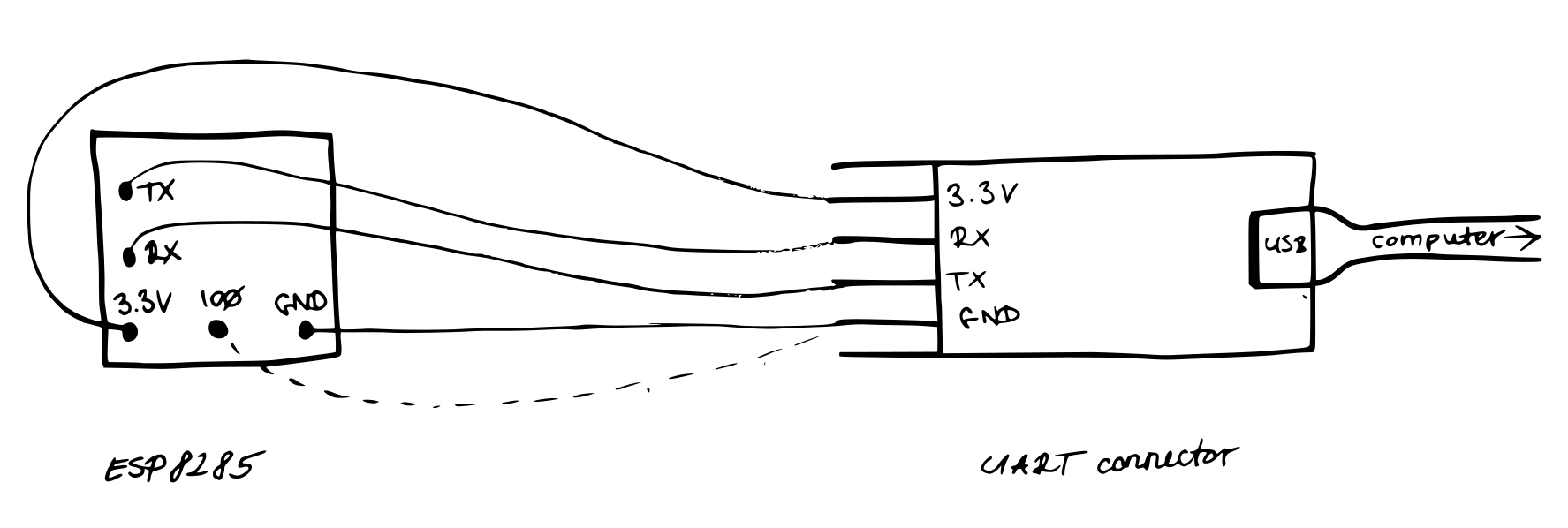
?bulb-to-computer diagram.png
